Home
Access the Merchants Management section from the left-side menu to get/set your credentials, set your gateway info, customize your plans, manage your shopper emails, set webhooks related to your plans, and manage users on your account.
If you are a single merchant, you will see your General Details on the front page of this section (refer to General Details section below):
If you have access to more than one merchant, you will see a list of merchants, and you can access a search that allows you to view and manage your merchants.
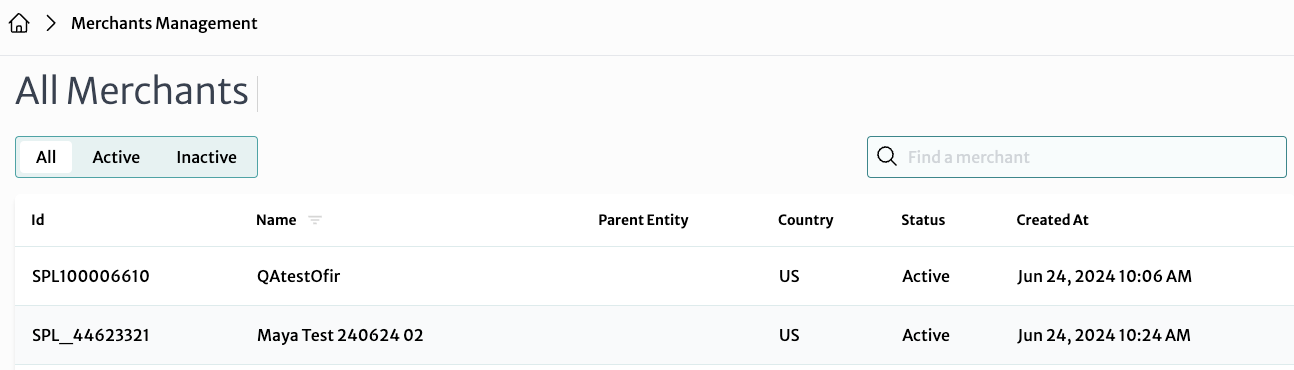
- Each row includes Merchant Id, Name, Parent Entity, Country, Status, and Created At (time). You can filter merchants by All, Active and Inactive statuses, using the tabs at the top
- Click on a merchant from the list to go to the Merchant Details page, where you can manage the selected merchant's settings and configurations
General Details
The box here shows basic information about your selected merchant account (whether you just have one, or it's the selected one; it will show up on the front page if you only have one merchant):
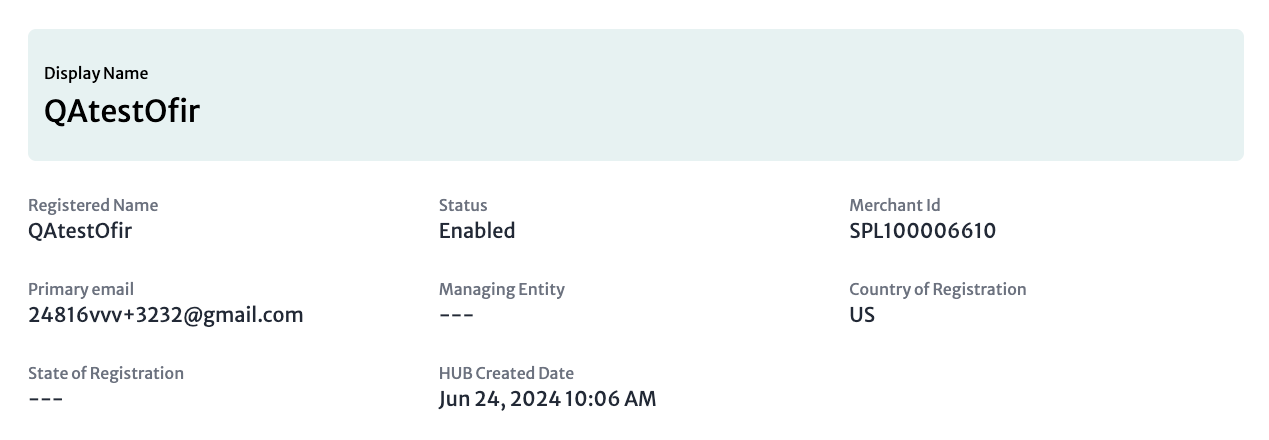
- Display Name: The public name of the merchant
- Registered Name: The official name of the merchant as registered in the system
- Status: The merchant's current operational status
- Merchant ID: A unique identifier for the merchant within the Splitit system
- Primary Email: The main email address associated with the merchant for contact and notifications
- Managing Entity: The entity responsible for managing this merchant
- Country of Registration: The country where the merchant is registered
- State of Registration: The state within the country where the merchant is registered
- Created Date: The date and time when the merchant was created in the system